 RSVP to our events
 Astrospheric Sky Forecast
MHAA Membership Account Management
MHAA Membership Account Management
Cost
We keep our membership fees as cheap and affordable as possible. For current pricing or to join as a new member, refer to the Join page.
Forms of payment
We can accept credit cards through PayPal, or checks and cash paid in person to one of the MHAA officers. If using PayPal, we ask that you pay one dollar extra to cover the service's fees.
If you choose check/cash and complete the checkout form, your account will be in a hold state until the treasurer or membership manager confirms receipt of your payment and approves it.
Managing your membership
Your MHAA website account
Members can sign in to manage their account and profile or access member-only features and content. If you're already logged in, clicking on your name in the top right corner then on My Account will take you to your account and profile section. You will see your current membership type (Yearly, Lifetime), its cost, etc.
From there, you can
- View/Change/Cancel your membership
- Renew your membership (link appears as you approach the end of your term)
- Update your profile
- Access your membership card
For changes and renewals, you will be prompted to pay through PayPal or to indicate that you are paying by check just as with your initial signup. If paying by check, the change will be pending until payment is confirmed by our membership officer.
Renewing your MHAA membership
Whether your membership has already expired or is merely about to, you can renew it from your MHAA website account dashboard. When your membership is within 30 days of expiring you will receive an email reminder and your account dashboard will contain a Renew now link under the My Memberships section.
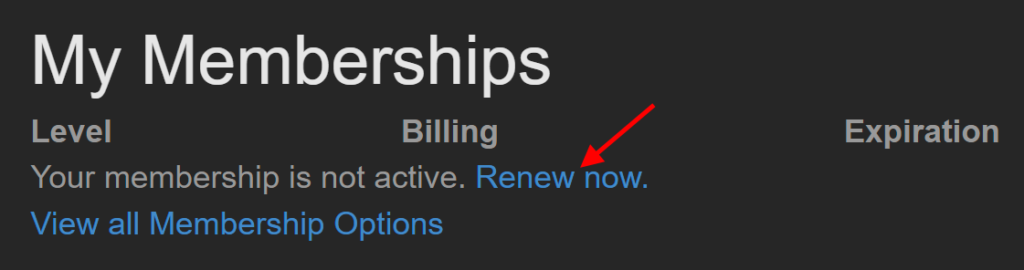
Clicking the Renew now link takes you to the checkout for a yearly membership. If you pay through PayPal your account will immediately reflect the extension of your membership or if it was already expired your account will immediately be reinstated to active status. If you choose to pay by check/cash, there will be a delay as receipt of payment will need to be confirmed and your account updated manually before it's reflected on the website. Therefore, your membership and online member content access may temporarily lapse while the manual process is in progress.
Canceling your MHAA membership
If you want to cancel your MHAA membership entirely you can do so from your MHAA website account. Simply login to the MHAA website and click on your name in the top right corner then on My Account. Then click Cancel under the My Memberships section.
Alternatively, if you are at the end of your membership time frame you can simply let it expire without paying for the renewal.
When canceling in either manner, your MHAA subscription and access to MHAA benefits will remain available until the natural end of your membership timeframe.
Auto renewal
At checkout when signing up for a paid membership or renewal through the website, if you select to pay with PayPal you can opt to enable auto renewal. If enabled, you'll receive an email each year before the renewal payment is about to be charged and a receipt after it is.
Managing auto renewal
If you want to change which credit card or bank account PayPal charges your dues to or cancel the auto renewal completely, that is managed within your PayPal account.
After canceling auto payment, your membership remains active through its normal expiration date. You will receive an email regarding renewal a few weeks before that at which point you can manually pay to renew or let it expire to cancel your membership.
As of October 2021, this link should take you to your list of auto payments in PayPal:
Or you can follow these manual steps:
- Log into your PayPal account
- Click on the Settings icon <i class="fas fa-cog"></i> in the top right corner to get to your account settings
- Click the Payments tab
- Click on Manage automatic payments
From the list on that page you can select the autopayment you want to change/cancel.