 RSVP to our events
 Astrospheric Sky Forecast
Bhatinov Mask drawing generators
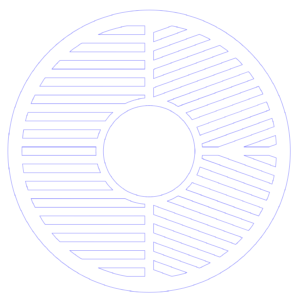
Bhatinov Mask
A focusing aid that creates three diffraction spikes around a star; when the center spike is perfectly centered between the other two, focus is achieved.
Why choose it:
- Fast, reliable focusing for any telescope.
- Simple pattern that’s easy to interpret.
- Best for beginners or anyone who only needs accurate focus.
Advantages:
- Extremely accurate focus indication
- Works on nearly all optics
- Easy to manufacture and use
Disadvantages:
- Focus only — provides no collimation information
- Single-axis sensitivity; doesn’t diagnose tilt or optical asymmetry
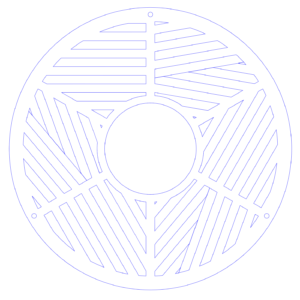
Tri-Bhatinov Mask
A Bahtinov mask split into three independent Bahtinov zones, each sampling a different sector of the aperture
Why choose it:
- Focus + collimation/tilt insight in one tool
- Shows whether different parts of the optical path reach focus simultaneously
Advantages:
- Detects collimation errors, tilt, or asymmetric focus
- Still provides clear Bahtinov-style focusing spikes
- Useful for SCTs, Maks, Newtonians, and imaging trains with tilt risk
Disadvantages:
- More complex diffraction pattern
Slightly slower to interpret - Not necessary if your system is already well-collimated
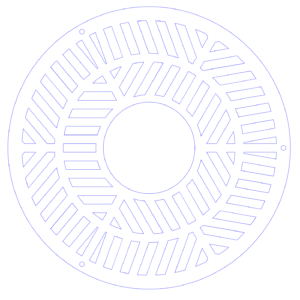
Tri-Bhatinov Mask v2
An improved Tri‑Bahtinov design with cleaner sector separation, better spike contrast, and more consistent line density for easier reading.
Why choose it:
- You want the diagnostic power of a Tri‑Bahtinov but with cleaner, more readable spikes
- Ideal for users who frequently adjust tilt plates, reducers, or imaging trains
Advantages:
- Sharper, more distinct spike sets
- Faster interpretation than the original Tri‑Bahtinov
- Better performance on fast optics or small apertures
Disadvantages:
- Still more visually complex than a standard Bahtinov
- Overkill for users who only need simple focus
Bahtinov Mask Drawings Generator
This is Bahtinov Mask generator. Cloudynights thread
Programmed by Satoru Takagi.
If you are interested in collimation, you may consider the tri-bahtinov mask.
Unit:
| Focal Length : | |
| Outer Diameter : | Aperture |
| Inner Diameter : | Central Obstruction |
:Use 3rd order spectrum
inW:
outW:
:Rounding
hiddenDL
SVG Source
Download using upper button or copy following source text and save as
[maskName].svg using text editor, and open it by inkscape.
If you want a DXF file, you can export the DXF with Inkscape's "Save As".
Provided, to maintain scale,
you should change the base unit to "mm" or "in" in the options dialog that appears.